On the morning of October 3, my agent stopped halfway through a long session on this site's codebase with this:
HTTP 429: The usage limit has been reachedThen it happened again before lunch.
I run a lot of my day through Hermes Agent, the open-source agent from Nous Research. Long coding sessions, often with a few subagents running alongside. Until recently, most of that ran on Codex through my ChatGPT account, and a ChatGPT plan gives Codex a usage allowance that refills over time. An agent that reads a 300k-token conversation on every call gets through that allowance quickly.
That afternoon I added a second OpenAI account to Hermes. At 16:33 the same session hit the same limit, and this time it didn't stop. It wrote one line to the log and carried on with the other account:
2026-10-03 16:33:56,177 run_agent: Credential 429 (rate limit) — rotated to pool entry 66c71cOver the next two weeks it did that 18 times.
This post covers how that works, how I set it up, and how you'd do the same with API keys or with several providers. It also covers the parts I only found by reading two weeks of logs: the cache you throw away on every switch, the days the pool didn't save me, and the day it quietly stopped working.
What a credential pool is
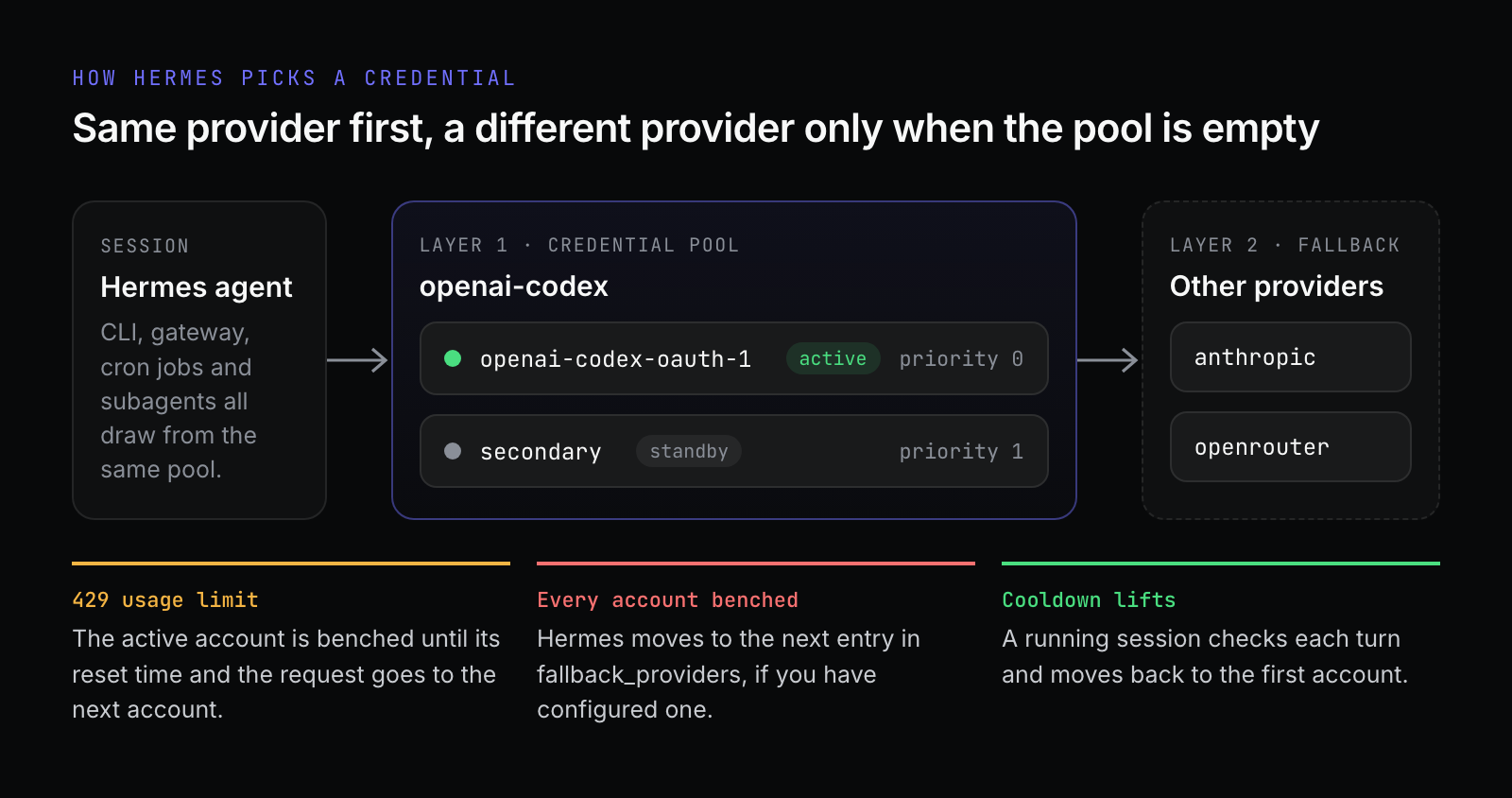
A credential pool is a list of credentials for one provider. Hermes picks one and uses it. When the provider says that credential is out of quota, Hermes benches it and sends the request to the next one. Same provider, same model, same conversation. You don't have to do anything.
It's easy to confuse with fallback providers, which Hermes also has:
A pool rotates between credentials for the same provider: two OpenAI accounts, three OpenRouter keys.
A fallback switches to a different provider altogether, say from OpenAI to Anthropic, when the primary fails.
Hermes always tries the pool first. Only when every credential in it is benched does it move on to the fallback chain.
How I set it up
Every Codex login in Hermes is a pool entry, even if there's only one. My first account was already there from when I set Hermes up, under the default label openai-codex-oauth-1. Adding the second one was a single command:
hermes auth add openai-codex --label secondaryHermes starts a device-code login. It prints a URL, https://auth.openai.com/codex/device, and a one-time code. You open the URL, sign in, enter the code, and the new credential lands in the pool.
There's one thing to get right here: you have to sign in as the other account. If your browser is still logged in to the first one, it's very easy to approve the code with the wrong account. I used a private window.
If you do get it wrong, Hermes notices:
warning: this login is the same OpenAI account as openai-codex credential #1 ("openai-codex-oauth-1"). Both logins share one token family, so OpenAI will revoke the older one and you gain no extra quota. Log into a different account instead, or keep just one (`hermes auth remove openai-codex 1`).Two logins of the same account don't give you two credentials. They share one token family upstream, so the second login quietly kills the first.
If your organization blocks device-code sign-in, hermes auth add openai-codex --browser does a normal browser redirect to localhost:1455 instead.
Then check what you've got:
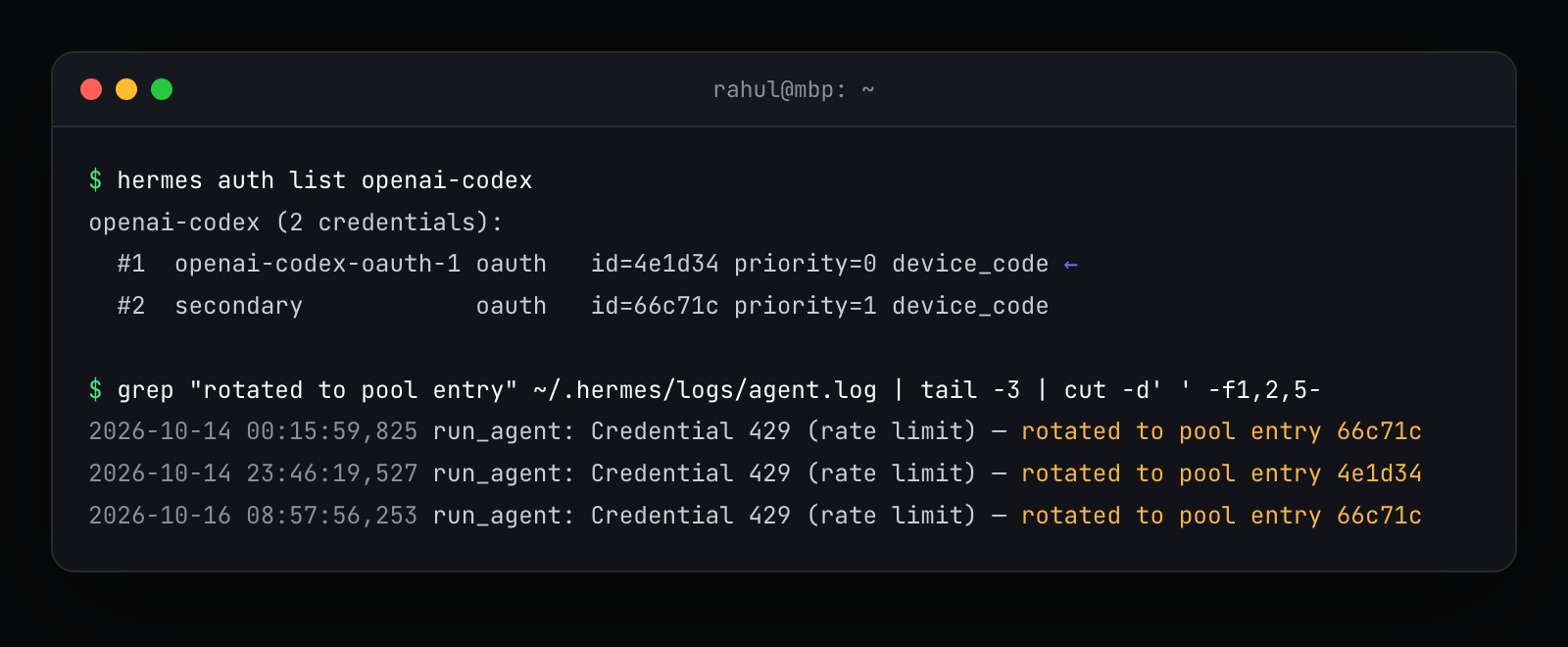
The arrow marks the credential in use right now. priority is the order Hermes tries them in. The second command is the one I run whenever I want to know whether the pool has been doing anything.
Picking a rotation strategy
I left mine on the default, fill_first: use the first account until it runs out, then move to the next. The other options are round_robin, which cycles through credentials evenly, least_used, which picks the one selected least often, and random.
For subscription accounts I'd stick with fill_first. The reason is further down, but the short version is that every switch costs you the prompt cache, and spreading load evenly means switching more often.
You can pick a strategy from the interactive hermes auth menu, or set it in ~/.hermes/config.yaml:
credential_pool_strategies:
  openai-codex: fill_first
  openrouter: round_robin
To have a particular account tried first, move it to the front:
hermes auth priority openai-codex secondary 0What happens when a limit hits
Hermes doesn't treat every 429 the same way, and that turned out to matter.
A Codex "usage limit reached" error rotates straight away. Retrying is pointless because the window isn't going to reopen in five seconds. A generic 429 gets one more try on the same credential in case it was a blip, and a second one rotates. A 402 billing error rotates immediately. A 401 tries to refresh the OAuth token first and only rotates if the refresh fails.
The benched credential stays out until the reset time the provider reports, or an hour if the provider doesn't say. Then comes the part I like most. A session that rotated away checks at the start of every turn whether the first account is usable again, and moves back as soon as it is. A long session doesn't drift onto the second account and stay there forever.
The bench is shared, too. When one session marks an account as exhausted, my other sessions skip it instead of finding out the hard way. In the log that looks like this:
Credential already exhausted (last_status=exhausted) — rotating immediately instead of retryingHere's what two weeks of it looked like, counted straight from ~/.hermes/logs/agent.log:
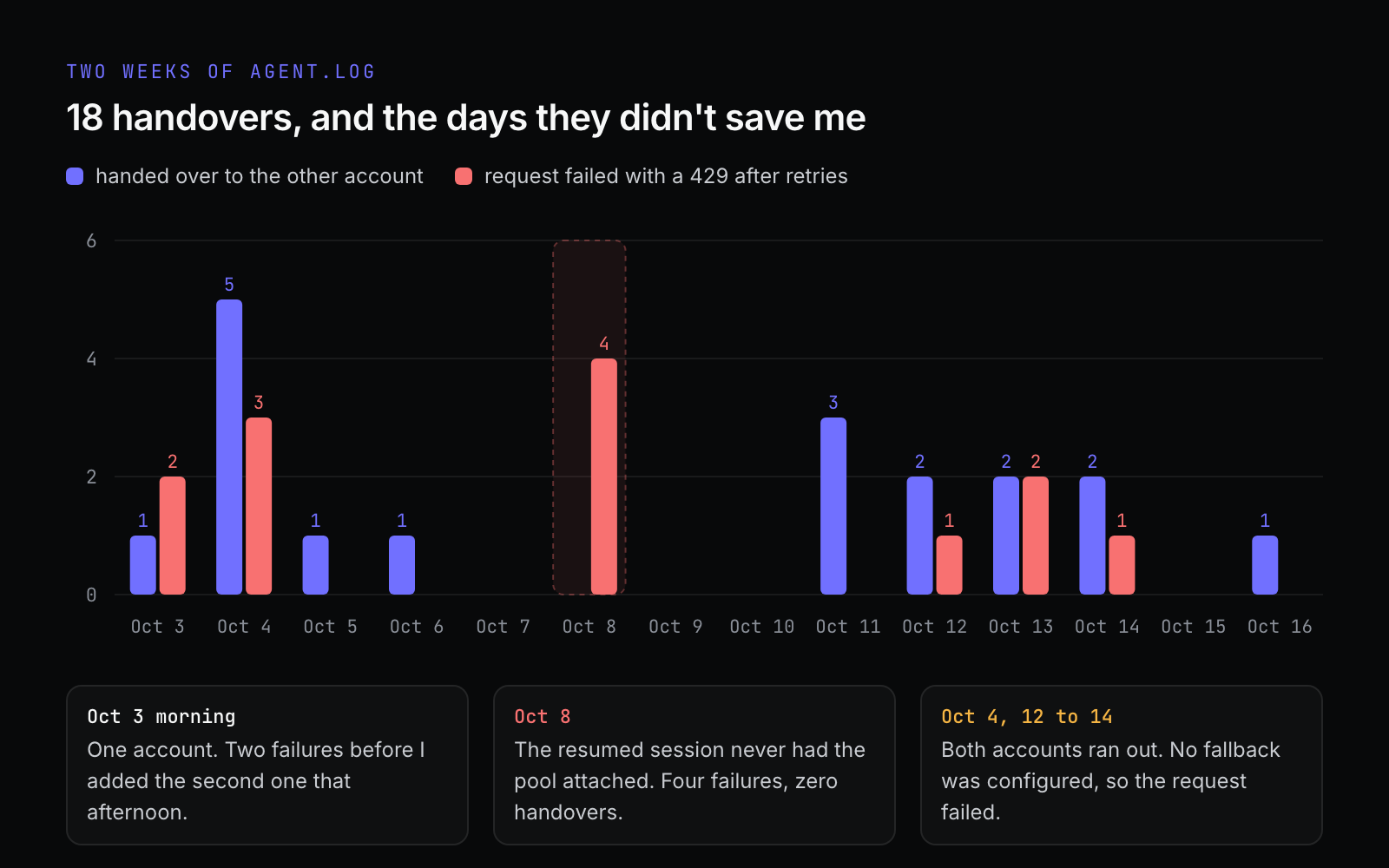
The purple bars are the pool doing its job. The red bars are requests that failed anyway, and I learned something from every one of them. More on those in the caveats.
Other ways to set it up
Several API keys for one provider
For providers that use API keys, add the key interactively:
hermes auth add openrouterHermes prompts for the key. There's also an --api-key flag, but I'd skip it, because it leaves the key in your shell history.
You can also skip storing keys in Hermes entirely by numbering your environment variables. Next to OPENROUTER_API_KEY, set OPENROUTER_API_KEY_2, OPENROUTER_API_KEY_3 and so on, in ~/.hermes/.env or wherever your secrets live. Each one becomes a pool entry the next time the pool loads. Discovery stops at the first missing number, so a _4 with no _3 is ignored.
Before you bother, check whether the keys actually have separate limits. OpenAI's API documentation says it plainly: rate limits are defined at the organization and project level, not per user. Two keys from the same organization draw from the same limits, and pooling them gets you nothing. You need keys whose limits really are separate, which usually means separate accounts.
Two accounts with the same provider
That's my setup: two separate OpenAI accounts, each added with hermes auth add openai-codex. Anthropic and Nous Portal logins work the same way. For those, hermes auth add asks whether you're adding an API key or an OAuth login.
The rule is the same everywhere: they have to be different accounts. Logging in to the same account twice gets you nothing.
More than one provider
Each provider gets its own pool, so you can stack them. Behind the pool you put a fallback chain, which Hermes walks in order once the pool is empty:
hermes fallback add    # the same provider and model picker as `hermes model`
hermes fallback list
That writes a fallback_providers list to config.yaml:
fallback_providers:
  - provider: anthropic
    model: claude-sonnet-4.6
  - provider: openrouter
    model: anthropic/claude-sonnet-4
Each of those providers can have its own pool as well. Hermes works through the Codex accounts first, then Anthropic (rotating through its pool if it has one), then OpenRouter.
One setting is worth knowing about: fallback.min_switch_reset_seconds. If the primary says it'll be back in 90 seconds, you might prefer to wait rather than change providers in the middle of a task. Set it to 120 and Hermes waits out any reset shorter than two minutes.
Switching providers mid-conversation is a much bigger change than switching accounts. The new model reasons differently and picks up your conversation cold. I treat the fallback as the thing that keeps a session alive, not something I want happening every afternoon.
Why it's worth the five minutes
Before the pool, hitting the limit meant the session stopped. I could wait for the window to reset, or switch to another provider by hand with /model in the middle of a task. With the pool, it cost me a line in a log file that I only read when I sat down to write this post.
It also works when you're not watching. Everything running from the same Hermes home (the CLI, the messaging gateway, scheduled jobs) draws from the same pool, and subagents inherit the parent's pool automatically. If you leave the agent working on something overnight, one account's limit doesn't end the run.
And it's cheap to run. Setup is one command, there's nothing to maintain, and the session moves back to the first account on its own when that account's window reopens.
The caveats
Every switch throws away the prompt cache
Provider prompt caches belong to the account that made the request. The new account has never seen your conversation, so the first call after a switch processes the whole thing from scratch. I knew that in theory. The logs made it concrete:
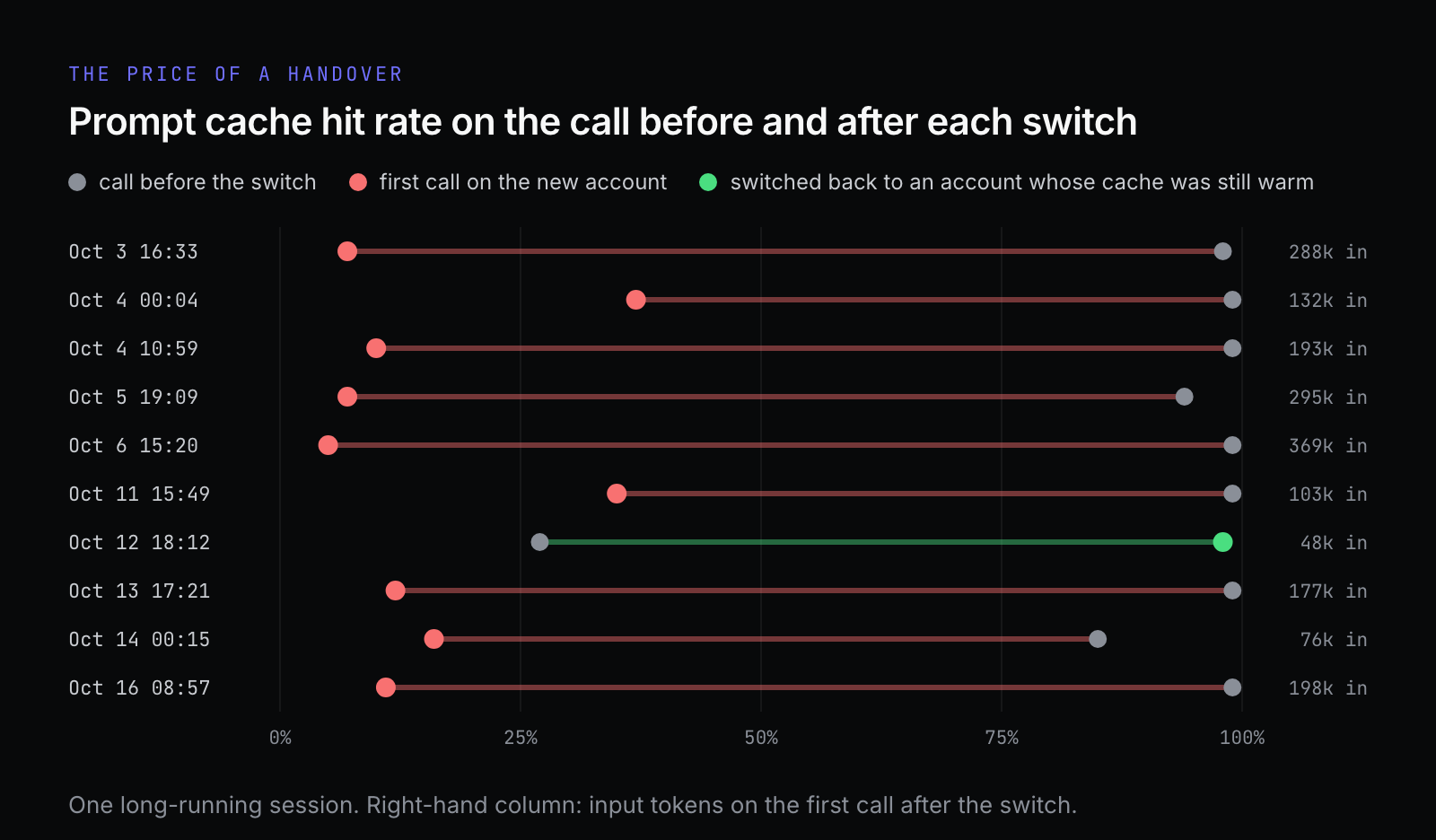
On October 6, the session was carrying about 411k tokens of context with a 99% cache hit rate. The first call on the other account read 369k tokens with 5% cached. Almost every switch looks like that. The one green row is the exception: the pool had moved back to an account whose cache hadn't expired yet, and the hit rate went from 27% to 98%.
On a ChatGPT plan there's no bill for this, and I couldn't find a consistent latency penalty in my logs. On an API key, each switch is a full-price read of the whole conversation, and so is switching back once the old cache has expired. That's why I keep fill_first and don't spread load evenly.
Two accounts means more room, not unlimited room
On October 4, and again on the 12th, 13th and 14th, both accounts ran out. On the 4th it happened within about twenty minutes of each other, with several sessions running at once: the first account was benched just after midnight, and by 00:26 the second one was gone too. I had no fallback configured, so those requests simply failed.
A pool multiplies your headroom by the number of accounts in it. If you regularly use more than that, you need a fallback, or fewer parallel sessions.
Rotation can stop without telling you
On October 8, a session hit the usage limit four times and failed every time. There was no rotation and no "marking exhausted" line, even though the second account was sitting there, perfectly healthy.
When I dug in, it turned out the session had been resumed, and its saved settings included the standard Codex endpoint URL. On resume, Hermes treated that URL as an explicit endpoint override, and the explicit path builds its client without the pool. Nothing was wrong with the credentials. The session just never had the pool attached.
I patched it locally and opened a fix upstream, hermes-agent#136553, which is still open as I write this. Switching models with /model before your first message is a related path, with a separate fix in review. Until those land, here's how to tell whether the pool is actually in play:
grep -E "marking .* exhausted|rotated to pool entry|failed after .* retries" ~/.hermes/logs/agent.log | tail -20If a "failed after 3 retries" line has no "marking ... exhausted" line in front of it, the pool wasn't involved. A fresh session doesn't carry the saved URL, so starting one avoids this particular path.
Read your provider's terms
OpenAI's Terms of Use list circumventing "any rate limits or restrictions" among the things you may not do. Whether pooling two accounts counts as that is a question for your own reading of the terms, not for a blog post. I'm not a lawyer.
The setup I'm comfortable with is two accounts that are mine and used only by me, which is the same thing as logging in to the other account by hand when the first one runs out. Rotating through throwaway free accounts, or sharing accounts with other people, is a different thing, and I wouldn't do it.
Smaller things
Each Hermes profile has its own
auth.json, and with it its own pool. An always-on gateway profile needs its own login:hermes -p <profile> auth add openai-codex.Don't copy
auth.jsonfrom one Hermes home to another. OAuth refresh tokens are single-use, so two copies end up fighting over one token. Profiles that should share a login can point at the sameHERMES_HOMEinstead.~/.hermes/auth.jsonholds the tokens for every account in the pool. Mine is mode 600. Keep it out of shared backups and dotfile repos.A login that has been revoked for good is logged once as a warning and dropped from rotation until you sign in again. If your pool suddenly seems smaller, look for that warning.
The commands I actually use
# every pool, and which credential is active
hermes auth list
hermes auth list openai-codex

# add credentials
hermes auth add openai-codex --label secondary   # device-code login
hermes auth add openai-codex --browser           # if device code is blocked
hermes auth add openrouter                       # prompts for the key

# order, cooldowns, cleanup
hermes auth priority openai-codex secondary 0    # try this one first
hermes auth reset openai-codex                   # clear cooldowns
hermes auth refresh openai-codex secondary       # refresh one OAuth login
hermes auth remove openai-codex 2

# interactive menu: add, remove, reset, choose a strategy
hermes auth

# cross-provider fallback
hermes fallback add
hermes fallback list

# did it rotate?
grep "rotated to pool entry" ~/.hermes/logs/agent.log | tail
The full reference is in the Hermes docs on credential pools and fallback providers.
Would I do it again?
Yes, without thinking about it. It took one command and a private browser window, and for the weeks I ran it, one account's limit stopped being the thing that ended a session.
Two weeks of logs did change how I think about it, though. A pool gives you more capacity. It didn't help when both accounts ran dry, and it didn't help on the day the session never had the pool attached. If I set it up again, I'd add a fallback chain on day one. I'd also make a habit of something I now recommend to anyone running a pool: when something looks like a quota error, check the log to see whether it rotated.