I was writing Terraform for an EKS cluster a few weeks ago when I asked myself the question every Kubernetes engineer gets to eventually:
Kubernetes already has Secrets. Why would I pay for AWS Secrets Manager?
My gut answer was the usual one. A Kubernetes Secret is just base64, and base64 isn't encryption. True, but it isn't the whole answer, and I wanted to understand what actually happens, not repeat what everyone says.
So I built a small Go service, gave it the kind of configuration a real production service needs, and followed every value from the place it's created to the moment the process reads it. Along the way I pulled a database password out of etcd in plain text, watched a rotated password fail to reach a running pod for over two minutes, and finally understood what IRSA and Pod Identity do under the hood.
This post walks through all of it. By the end you should be able to answer four questions for your own cluster:
Where should each kind of value live: a ConfigMap, Parameter Store, or Secrets Manager?
How does a value in AWS end up inside a pod?
How does a pod get AWS permissions without anyone handing it keys?
What really happens when a password rotates?
Everything here runs. The code, the Terraform, the manifests and a local lab are in rahulbalajee/eks-secrets-lab. The lab runs on your laptop with kind and a fake AWS, so you don't need an AWS account to follow along, and every terminal screenshot below is real output from it.
The app: a transcoder with three kinds of configuration
The example is a video transcoding worker, because that's the world I spend most of my time in. It pulls jobs from an SQS queue, transcodes the video, writes the result to S3, and records the job in a database.
Here is everything it needs to know, grouped by who owns it:
type Config struct {
	// From the ConfigMap: app tuning the team owns and reviews in Git.
	LogLevel     string
	Workers      int
	FFmpegPreset string

	// From Parameter Store via ESO: values Terraform produced.
	QueueURL     string
	OutputBucket string

	// From Secrets Manager via ESO.
	DBPassword string
}
Those three groups are the whole story of this post. They look similar from the app's point of view (they're all just strings), but they come from very different places:
The app team decides the log level, worker count and ffmpeg preset. Nobody else cares about them.
Terraform creates the queue and the bucket, and AWS decides the queue URL. You don't know it until the queue exists.
The database password is a credential. It needs rotation, an audit trail, and as few readers as possible.
Here's the full path we're going to build, end to end:
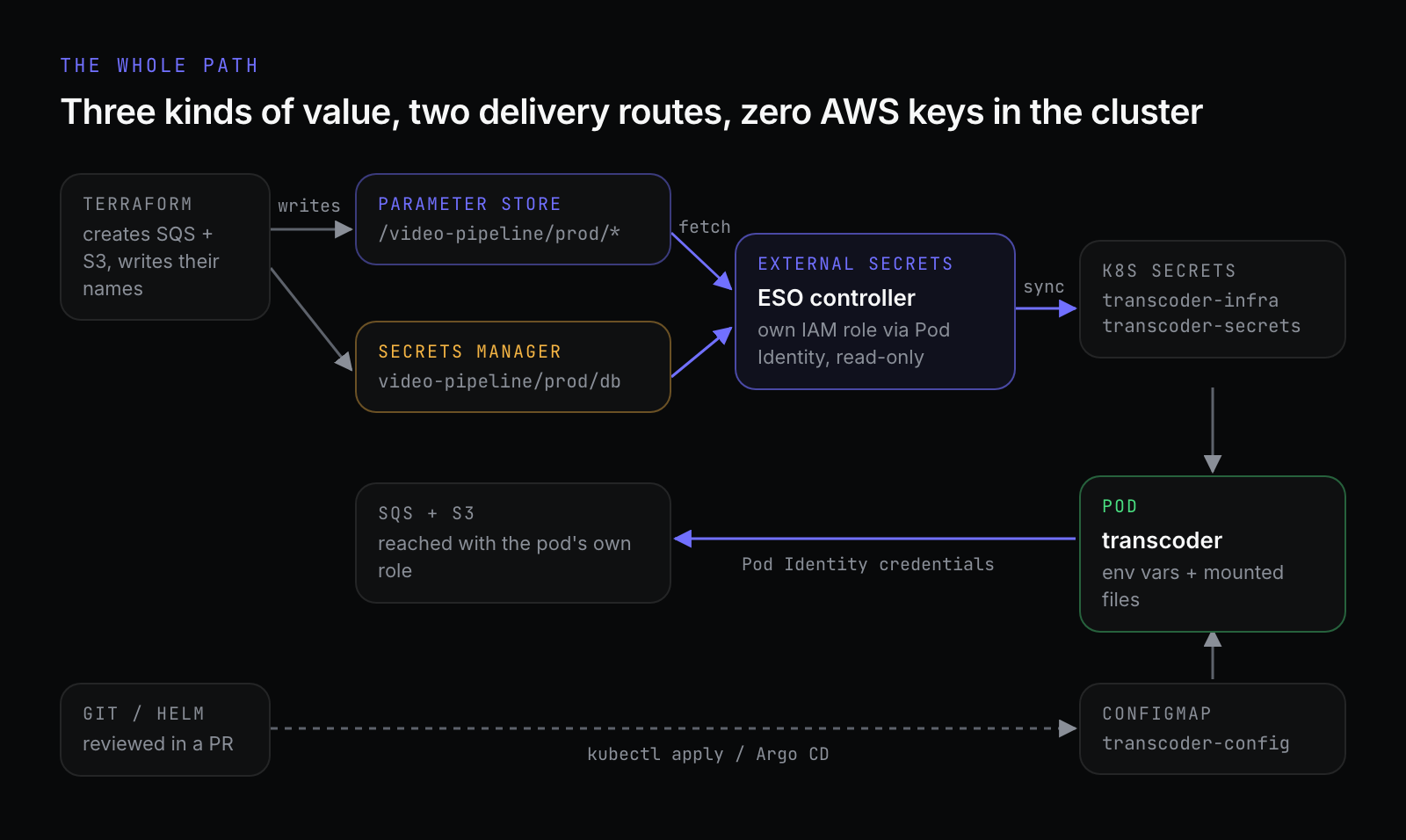
Notice what's missing: there isn't a single AWS access key anywhere in the cluster. We'll get to how that works. First, the question that started all this.
Kubernetes Secrets: base64 is not encryption
Once the lab is running, the database password lives in a Kubernetes Secret called transcoder-secrets. Let's see what that buys us.
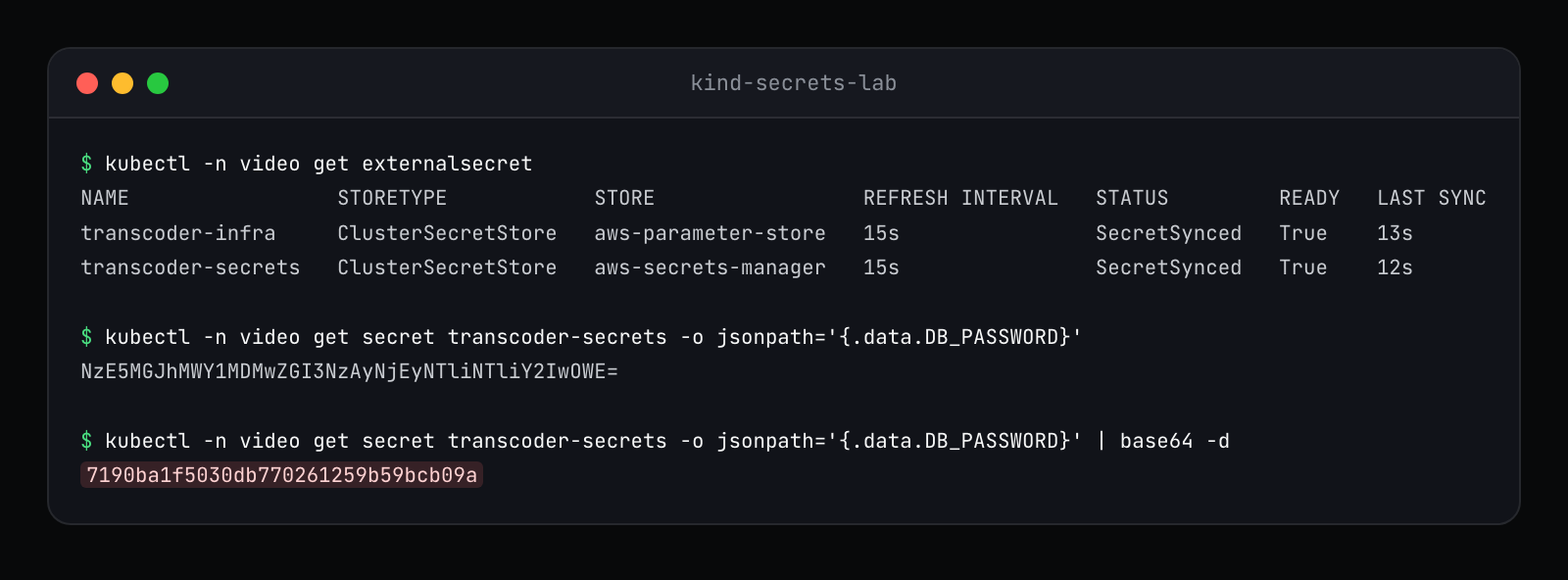
The value Kubernetes shows you is base64. One pipe later, it's the password. Anyone who can run kubectl get secret in that namespace can do exactly this.
That part most people know. What I wanted to see was where the Secret actually lives. Every Kubernetes object is stored in etcd, the cluster's key-value database. The lab has a small script that asks etcd directly for the raw bytes, the way someone with access to the disk or to an etcd backup could:
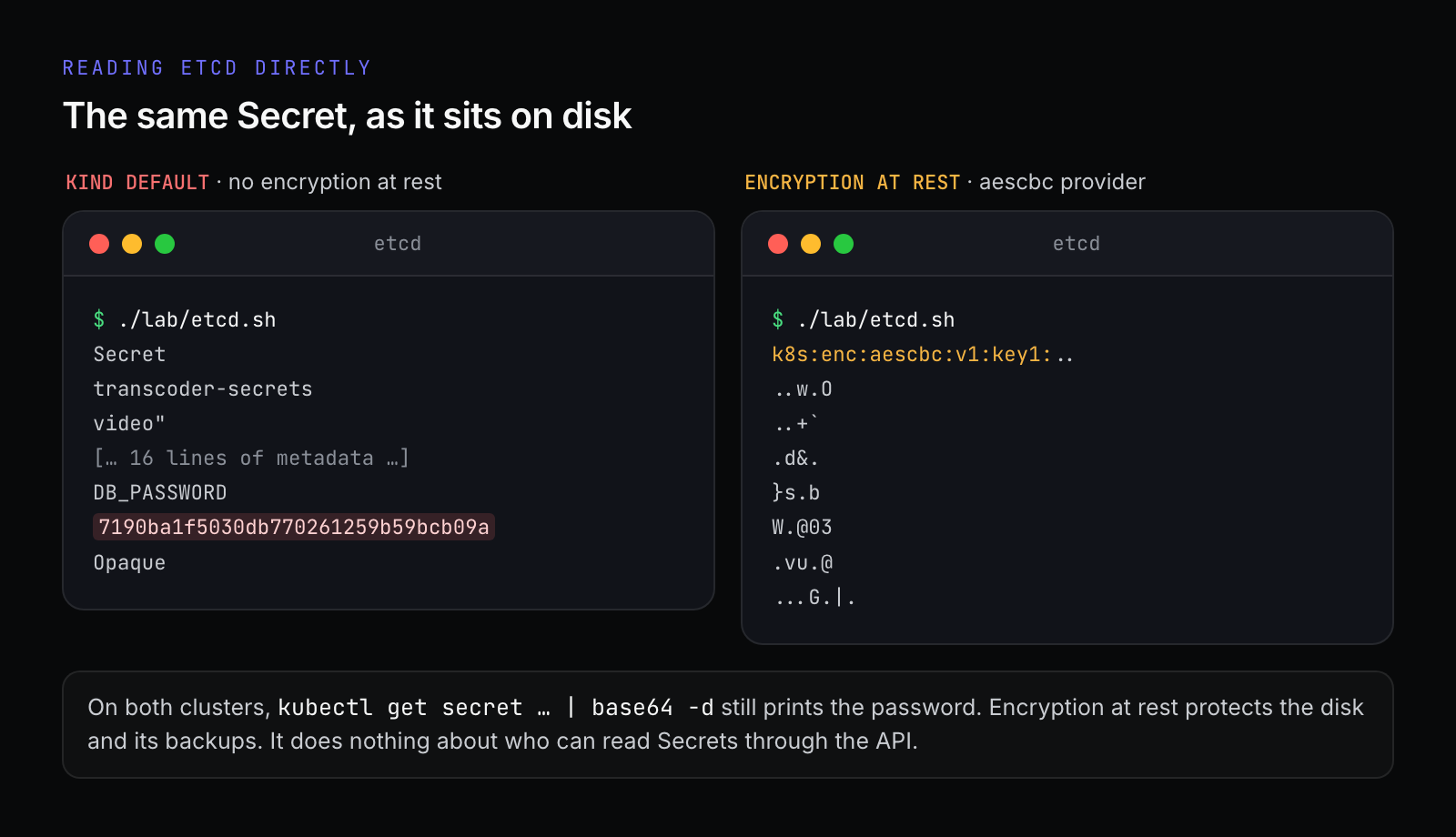
On the left, a default kind cluster: the password sits in etcd in plain text, right after the key name. On the right, a second cluster I created with encryption at rest turned on. Now etcd holds k8s:enc:aescbc:v1:key1: followed by ciphertext.
The Kubernetes documentation is blunt about the default:
Kubernetes Secrets are, by default, stored unencrypted in the API server's underlying data store (etcd). Anyone with API access can retrieve or modify a Secret, and so can anyone with access to etcd.
The same page adds the part people tend to miss: anyone who can create a Pod in a namespace can read every Secret in that namespace, because they can just mount it. That includes anyone who can create a Deployment.
What EKS gives you
On EKS you get the right-hand side for free. Since Kubernetes 1.28, EKS envelope-encrypts all Kubernetes API data by default, using KMS v2 with an AWS-owned key unless you bring your own. So the "Secrets are sitting in etcd in plain text" worry is mostly solved on a modern EKS cluster.
But look at the footnote in that screenshot again. On the encrypted cluster, kubectl get secret | base64 -d still prints the password. Encryption at rest protects the disk and its backups. It does nothing about who can read Secrets through the API, and that's how real leaks happen: an over-broad ClusterRole, a CI service account that can list Secrets cluster-wide, a developer with edit on a namespace.
So why Secrets Manager?
Because a Kubernetes Secret is a good delivery mechanism and a poor source of truth. If the only copy of your database password lives in a Kubernetes Secret, then:
it dies with the cluster, and comes back from wherever someone last copied it;
nothing outside the cluster can read it: not the Lambda, not the batch job, not the other cluster in the other region;
rotating it is a manual job, and nobody can tell you who read it last Tuesday.
Secrets Manager gives you rotation, IAM policies per secret, and a CloudTrail entry every time something reads it. The pattern I'd recommend is to keep the source of truth in AWS and treat the Kubernetes Secret as a cache the cluster refreshes. Which brings us to the real question.
ConfigMap, Parameter Store or Secrets Manager?
When I asked this, I expected a rule like "secrets go in Secrets Manager, everything else goes in a ConfigMap". The better question turned out to be different:
Who produces this value, and who else needs it?
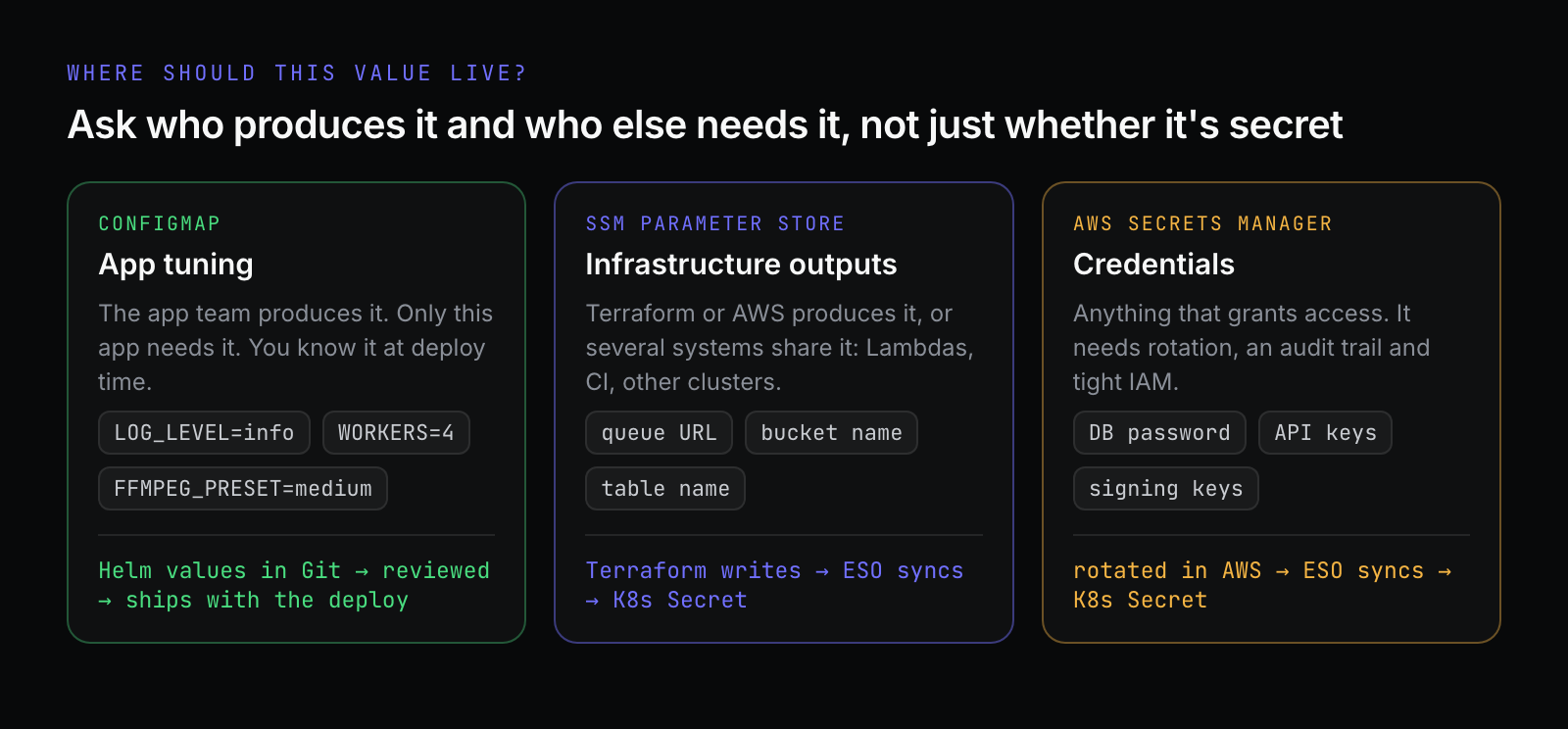
ConfigMap: the app team's knobs
If the app team produces the value, only this app uses it, and you know it at deploy time, put it in a ConfigMap (usually through Helm values). Log level, worker count, timeouts and ffmpeg presets all belong here.
This is the right choice more often than people admit, and it has a real advantage: the value lives in Git, gets reviewed in a pull request, and ships with the code. Config and code are versioned together, and a rollback rolls back both. Plenty of teams never touch Parameter Store and are perfectly fine.
Parameter Store: values infrastructure produces
Parameter Store earns its place in four situations:
Infrastructure creates the value. Terraform creates the SQS queue and AWS picks the URL. You could copy it into
values.yamlby hand, but it'll drift the day someone recreates the queue. Better to have Terraform write it to/video-pipeline/prod/transcode-queue-urland have the cluster read it from there. Infra publishes, apps consume, and nobody copies values around.Something outside the cluster needs it too. A ConfigMap is visible to pods in one namespace of one cluster. A Lambda, a CI pipeline, a second cluster or another Terraform stack can all read a parameter through IAM.
Many clusters or environments. Two production regions plus staging means three ConfigMaps to keep in sync. A parameter is one place.
Changing a value without a deploy. Useful for operational switches during an incident, and every change is versioned and logged in CloudTrail. The flip side is that a change made in the console skips code review, unless Terraform manages the parameter.
It's also cheap. Standard parameters cost nothing at standard throughput: up to 10,000 per account and region, 4 KB each. Advanced parameters go up to 8 KB, add policies and cross-account sharing, and cost $0.05 each per month.
Secrets Manager: anything that grants access
Passwords, API keys, signing keys: anything where a leak means someone else can act as you. You pay $0.40 per secret per month plus $0.05 per 10,000 API calls, and in exchange you get managed rotation, resource policies and an audit trail. (Parameter Store does have a SecureString type, which works for simple cases, but no managed rotation.)
Infra publishes: the Terraform side
Here's the "infra publishes, apps consume" idea in Terraform. The queue is created, and its URL goes straight into Parameter Store:
resource "aws_sqs_queue" "transcode" {
  name                       = "${local.name}-transcode-jobs"
  visibility_timeout_seconds = 900
  sqs_managed_sse_enabled    = true
}

resource "aws_ssm_parameter" "queue_url" {
  name  = "${local.param_path}/transcode-queue-url"
  type  = "String"
  value = aws_sqs_queue.transcode.url
}
Nobody types the URL anywhere. If the queue is ever recreated, the next terraform apply updates the parameter, and the cluster picks it up on its next refresh.
The database password needs more care, because of a detail that bites a lot of teams: Terraform state stores every attribute in plain text, including passwords. A random_password resource puts the password in your state file, and from there into the S3 bucket, every engineer's laptop and every CI log that dumps a plan.
Since Terraform 1.11, there's a clean way out. An ephemeral resource generates a value that's never saved, and a write-only argument sends it to AWS without recording it:
ephemeral "random_password" "db" {
  length  = 32
  special = false
}

resource "aws_secretsmanager_secret" "db" {
  name                    = local.secret_name
  recovery_window_in_days = 7
}

resource "aws_secretsmanager_secret_version" "db" {
  secret_id = aws_secretsmanager_secret.db.id
  secret_string_wo = jsonencode({
    username = "transcoder"
    password = ephemeral.random_password.db.result
  })
  secret_string_wo_version = var.db_password_version
}
The password goes to Secrets Manager and nowhere else. To rotate it from Terraform, bump db_password_version. Write-only values are never compared, so the version number is how Terraform knows to send a new one.
Apps consume: the External Secrets Operator
Now the values are in AWS, and something has to bring them into the cluster. That's the External Secrets Operator, or ESO, an open-source CNCF project.
It's an operator: a controller running in your cluster that watches custom resources and keeps reality matching what you declared. You install it once with Helm and then work with two kinds of resource.
A ClusterSecretStore says where to fetch from:
apiVersion: external-secrets.io/v1
kind: ClusterSecretStore
metadata:
  name: aws-secrets-manager
spec:
  provider:
    aws:
      service: SecretsManager
      region: eu-west-1
There's no authentication block, and no keys. With EKS Pod Identity, ESO uses the IAM role of its own controller pod, which we'll set up later. A namespaced SecretStore works the same way if you want each team to have its own.
An ExternalSecret says what to fetch and which Kubernetes Secret to create:
apiVersion: external-secrets.io/v1
kind: ExternalSecret
metadata:
  name: transcoder-secrets
  namespace: video
spec:
  refreshInterval: 1h
  secretStoreRef:
    kind: ClusterSecretStore
    name: aws-secrets-manager
  target:
    name: transcoder-secrets
  data:
    - secretKey: DB_PASSWORD
      remoteRef:
        key: video-pipeline/prod/db
        property: password
This one reads the password field from the JSON secret video-pipeline/prod/db and writes it into a Kubernetes Secret called transcoder-secrets under the key DB_PASSWORD. A second ExternalSecret does the same for the two Parameter Store values. Every refreshInterval, ESO calls AWS again and updates the Secret if anything changed.
The best part is what the app sees: an ordinary Kubernetes Secret. No AWS SDK code for config, and no idea AWS is involved:
    spec:
      serviceAccountName: transcoder
      containers:
        - name: transcoder
          image: transcoder:dev
          envFrom:
            - configMapRef:
                name: transcoder-config
            - secretRef:
                name: transcoder-infra
            - secretRef:
                name: transcoder-secrets
          volumeMounts:
            # The same Secret as files. The kubelet updates these in place.
            - name: secrets
              mountPath: /etc/transcoder/secrets
              readOnly: true
          # resources and securityContext trimmed; they are in the repo
      volumes:
        - name: secrets
          secret:
            secretName: transcoder-secrets
The same Secret is used twice on purpose, once as environment variables and once as mounted files. That difference matters a lot when we get to rotation.
And because your Git repository only holds the ExternalSecret (a reference to a secret, never the value), this fits GitOps tools like Argo CD and Flux without any extra tooling.
Things I noticed running it
The first deploy races. When I applied everything at once, the pod started before ESO had created the Secret and logged
MountVolume.SetUp failed for volume "secrets" : secret "transcoder-secrets" not found. The kubelet keeps retrying, so it sorts itself out within seconds, but don't panic when you see it. With Argo CD, putting ExternalSecrets in an earlier sync wave than the Deployment usually avoids it.Every refresh is an API call, and Secrets Manager calls cost money. 50 ExternalSecrets refreshing every minute is about 2.16 million calls a month, roughly $10.80. At the usual hourly refresh, it's 36,000 calls, about $0.18. Keep the interval long unless you need it short. The ESO docs warn about this too.
ESO isn't the only option. The Secrets Store CSI Driver with the AWS provider mounts secrets straight into the pod as files, without necessarily creating a Kubernetes Secret, so the value never sits in etcd. It's slightly more secure and less convenient if your app wants environment variables. Many EKS teams pick ESO for convenience and the CSI driver when they want secrets out of etcd entirely.
Rotation: the part nobody tests
This is where the lab paid for itself.
The lab sets refreshInterval to 15 seconds so you don't have to wait an hour. I rotated the password in (fake) Secrets Manager and timed every step, first without anything to restart the pods, then with Reloader installed:
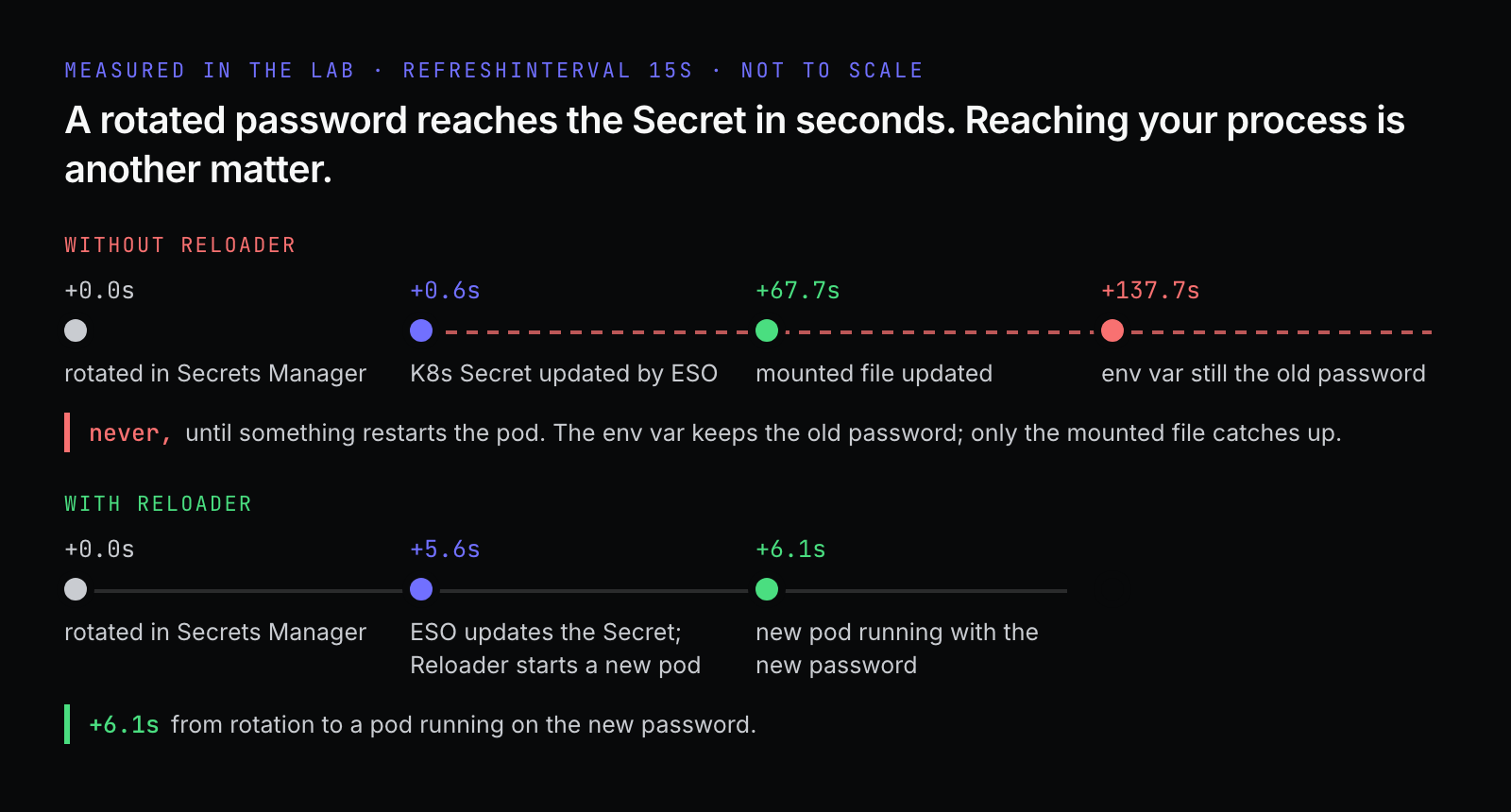
Without Reloader, ESO updated the Kubernetes Secret within a second. That was luck: it can take up to the full refresh interval. The mounted file caught up 68 seconds later. The environment variable never did. More than two minutes after the rotation, the app was still logging this:
level=WARN msg="db password changed on disk; this process still uses the old one" env=1ddc4fff file=3cb227be(The app logs a short hash of the password, never the password itself. Do the same in yours.)
This isn't an ESO bug. It's how Kubernetes works:
Environment variables are copied into the container when it starts. The Kubernetes docs say it directly: "If a container already consumes a Secret in an environment variable, a Secret update will not be seen by the container unless it is restarted."
Mounted files are updated by the kubelet on its periodic sync, so they lag by up to a minute or so. That matches the 68 seconds I measured. One exception: a volume mounted with
subPathnever updates at all.
So you have two options. You can make the app re-read the file and reconnect when it changes. Or you can restart the pods when the Secret changes, which is what Reloader does. It's one annotation:
metadata:
  name: transcoder
  namespace: video
  annotations:
    # Reloader rolls the pods when a referenced ConfigMap or Secret changes.
    # Environment variables are fixed when a container starts, so without
    # this a rotated password only reaches the app on the next deploy.
    reloader.stakater.com/auto: "true"
With it, Reloader noticed the change and started a new pod in the same second, and 6.1 seconds after the rotation a fresh pod was running with the new password. Its log line is clear about what happened:
Changes detected in 'transcoder-secrets' of type 'SECRET' in namespace 'video'; updated 'transcoder' of type 'Deployment' in namespace 'video'One more thing to plan for. During that rolling restart, old pods keep using the old password until they're replaced. If the database rejects the old password the instant it changes, those pods fail. Real rotation needs an overlap window where both passwords work, which is exactly why Secrets Manager offers an alternating users rotation strategy alongside single user.
Giving pods AWS access without keys
Two different things in this setup need AWS permissions: the ESO controller (to read parameters and secrets) and the transcoder itself (to read from SQS and write to S3). How does a pod get AWS credentials?
Static access keys in a Secret: long-lived, easy to leak, rotated by hand if ever.
The node's EC2 instance role: every pod on the node gets the same permissions, so your logging sidecar can delete the output bucket because the transcoder needed to write to it. Too broad.
What you want is for the transcoder's service account to get exactly the transcoder's IAM role, with short-lived credentials that rotate on their own. EKS has two ways to do that.
IRSA: the cluster as an identity provider (2019)
IAM Roles for Service Accounts builds on something Kubernetes already does: it can issue a signed token that proves "this pod runs as service account X". IRSA teaches IAM to trust those tokens.
Here is a real one from the lab: the same kind of token the kubelet mounts into an IRSA pod, with the sts.amazonaws.com audience:
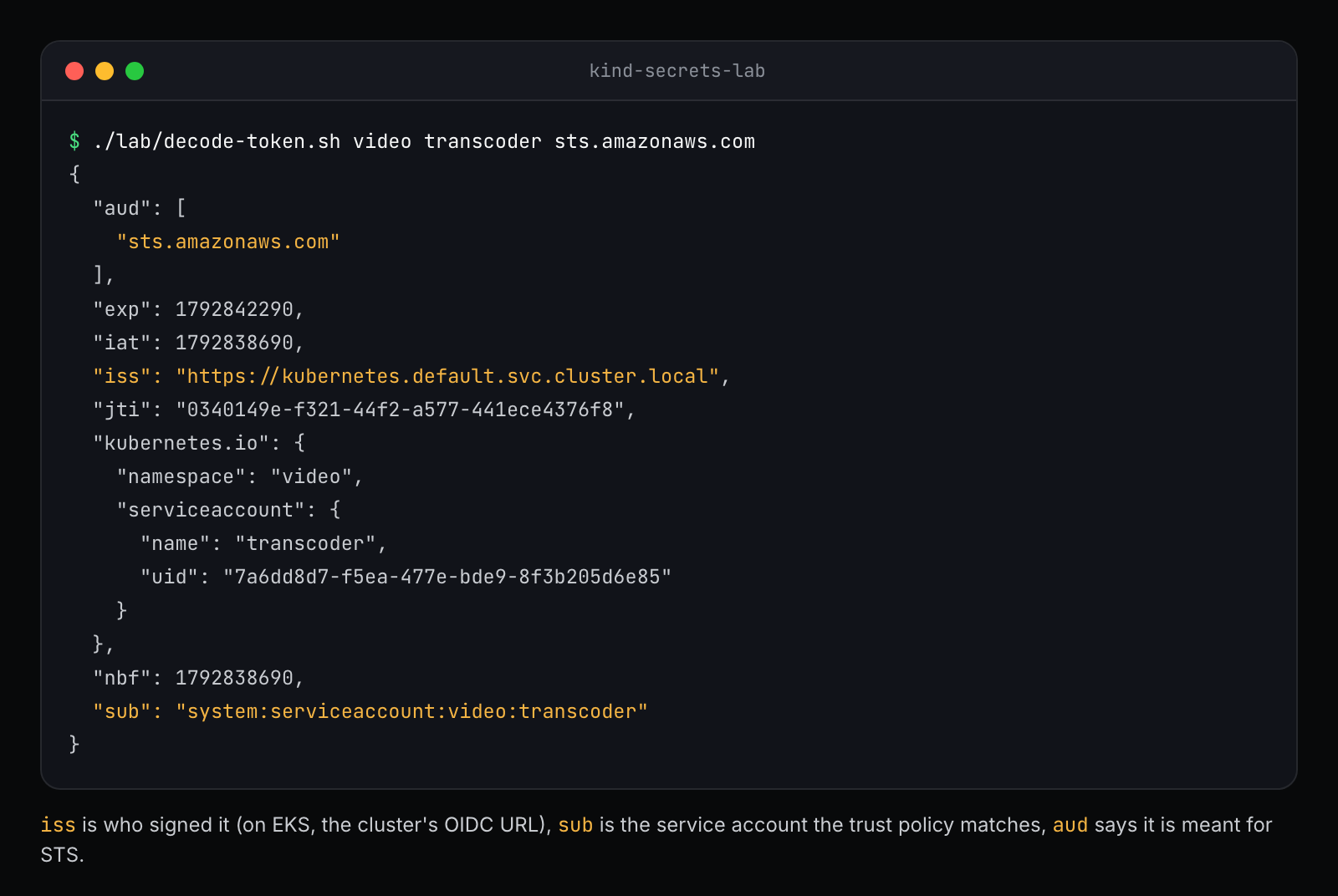
Three claims do all the work:
issis who signed the token. On EKS, it's your cluster's OIDC issuer URL, which publishes the public keys IAM uses to check the signature.subis the identity: namespace and service account.audsays the token is meant for AWS STS, so it can't be replayed somewhere else.
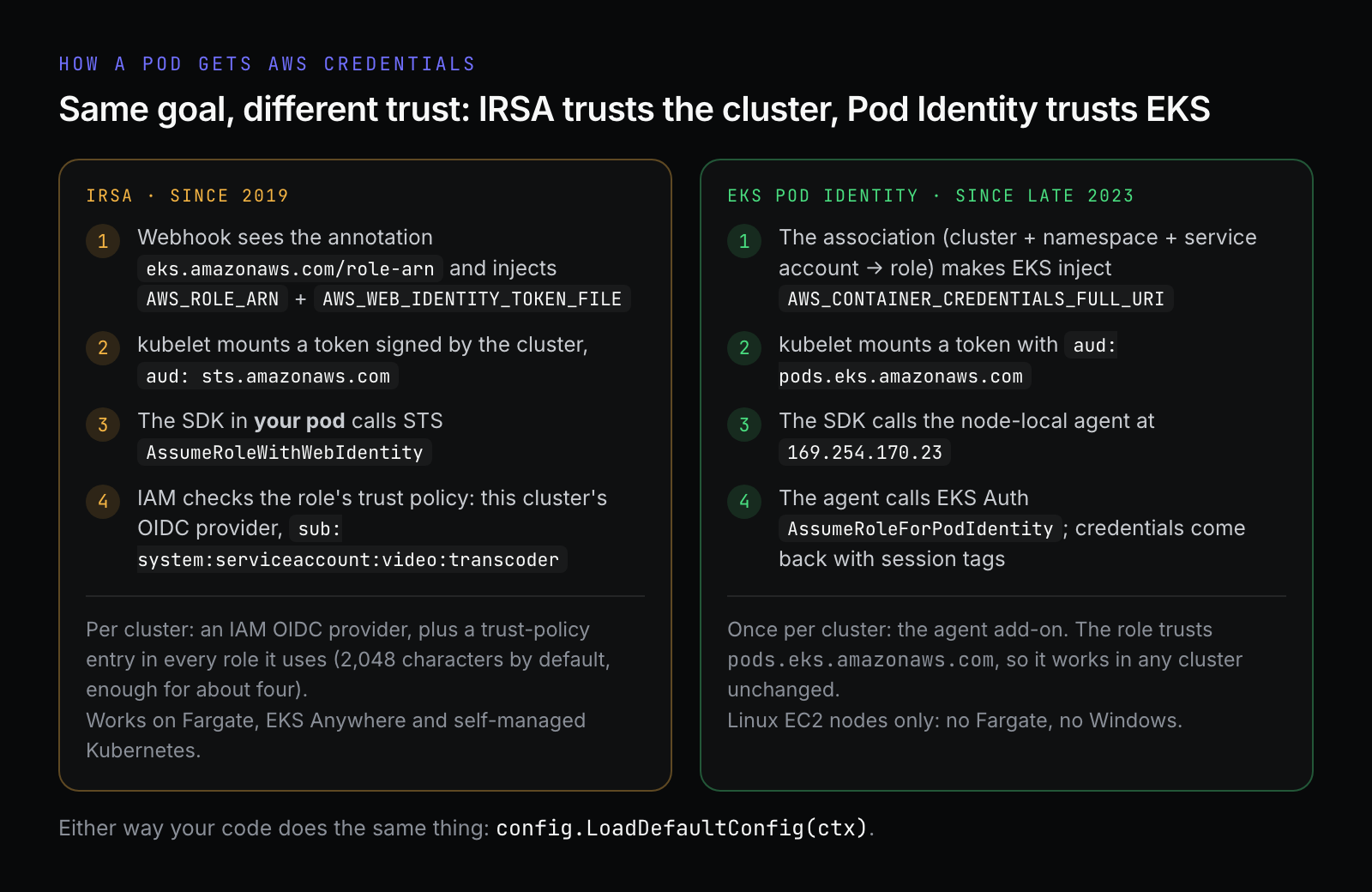
When the pod starts, an EKS webhook sees an annotation on the service account (eks.amazonaws.com/role-arn) and injects two environment variables, AWS_ROLE_ARN and AWS_WEB_IDENTITY_TOKEN_FILE. The AWS SDK in your pod reads them, calls STS AssumeRoleWithWebIdentity with the token, and gets temporary credentials back.
The trust policy on the role is where IRSA shows its age:
data "aws_iam_policy_document" "irsa_trust" {
  statement {
    effect  = "Allow"
    actions = ["sts:AssumeRoleWithWebIdentity"]

    principals {
      type        = "Federated"
      identifiers = [aws_iam_openid_connect_provider.eks.arn]
    }

    condition {
      test     = "StringEquals"
      variable = "${local.oidc_host}:sub"
      values   = ["system:serviceaccount:video:transcoder"]
    }

    condition {
      test     = "StringEquals"
      variable = "${local.oidc_host}:aud"
      values   = ["sts.amazonaws.com"]
    }
  }
}
oidc_host is specific to one cluster. Use the role in a second cluster and you need a second OIDC provider in IAM and another statement in this trust policy. A trust policy is limited to 2,048 characters by default, which AWS says fits about four of these, and an account can have 100 OIDC providers by default. For a handful of long-lived clusters, that's fine. For blue/green cluster upgrades or dozens of clusters, it gets painful fast.
EKS Pod Identity: EKS as the broker (late 2023)
Pod Identity moves the trust from "this cluster's OIDC provider" to "the EKS service". The pieces:
The Pod Identity Agent add-on runs as a DaemonSet on every node. It listens on the link-local address
169.254.170.23.The IAM role trusts one principal,
pods.eks.amazonaws.com, with no cluster-specific URL in sight.An association in the EKS API maps cluster + namespace + service account to a role. There's no annotation on the service account.
When a pod with an associated service account starts, EKS injects AWS_CONTAINER_CREDENTIALS_FULL_URI=http://169.254.170.23/v1/credentials and a token file. The SDK asks the agent on its own node for credentials; the agent calls the EKS Auth API (AssumeRoleForPodIdentity) and hands back temporary credentials. Your pod never talks to STS.
Here's all of it in Terraform:
resource "aws_eks_addon" "pod_identity_agent" {
  cluster_name = var.cluster_name
  addon_name   = "eks-pod-identity-agent"
}

data "aws_iam_policy_document" "pod_identity_trust" {
  for_each = {
    eso        = { namespace = var.eso_namespace, service_account = var.eso_service_account }
    transcoder = { namespace = var.app_namespace, service_account = var.app_service_account }
  }

  statement {
    effect  = "Allow"
    actions = ["sts:AssumeRole", "sts:TagSession"]

    principals {
      type        = "Service"
      identifiers = ["pods.eks.amazonaws.com"]
    }

    condition {
      test     = "StringEquals"
      variable = "aws:RequestTag/kubernetes-namespace"
      values   = [each.value.namespace]
    }

    condition {
      test     = "StringEquals"
      variable = "aws:RequestTag/kubernetes-service-account"
      values   = [each.value.service_account]
    }
  }
}

resource "aws_eks_pod_identity_association" "transcoder" {
  cluster_name    = var.cluster_name
  namespace       = var.app_namespace
  service_account = var.app_service_account
  role_arn        = aws_iam_role.transcoder.arn

  depends_on = [aws_eks_addon.pod_identity_agent]
}
The two conditions are worth explaining. Pod Identity attaches session tags to every set of credentials, including the cluster, namespace, service account and pod name, so the trust policy can insist on the right namespace and service account. The association already scopes the role; the conditions are a second lock in case someone associates the role somewhere it shouldn't be. The same tags make attribute-based access control possible, so one role can grant each namespace access only to its own resources. IRSA has no session tags.
Which one should you use?
AWS's own recommendation is Pod Identity wherever you can. I agree for new clusters: the setup is simpler, one role works across clusters unchanged, and you get session tags. But IRSA isn't going anywhere, and you still need it when:
pods run on Fargate or Windows nodes, where Pod Identity isn't supported;
the cluster isn't EKS: EKS Anywhere, ROSA, or self-managed Kubernetes on EC2;
an add-on or an old SDK doesn't support Pod Identity yet. For Go, you need aws-sdk-go-v2 from
release-2023-11-14or later.
Both can run in the same cluster, so you can migrate one service account at a time.
Your code doesn't change
This is my favorite part. The transcoder doesn't know or care which mechanism is in use:
	awsCfg, err := config.LoadDefaultConfig(ctx)
	if err != nil {
		return fmt.Errorf("load AWS config: %w", err)
	}
	creds, err := awsCfg.Credentials.Retrieve(ctx)
No keys, no profile. The SDK's default credential chain checks a list of places and stops at the first one that works. The app logs which provider won, and the names come straight from the SDK:
EnvConfigCredentials: access keys in environment variables. That's what the lab uses, because kind has no Pod Identity.WebIdentityCredentials: IRSA.CredentialsEndpointProvider: Pod Identity, through the agent.EC2RoleProvider: the node's role. If you see this in production, something isn't configured and your pod is running with the node's permissions.
Log it at startup. It turns a confusing AccessDenied into a one-line answer.
Gotchas I'd want someone to tell me
The credentials are injected when a pod is created. If ESO was installed before its Pod Identity association existed, its pods don't have them. Restart the deployment after creating the association.
ESO with Pod Identity uses the controller's role for every store. With IRSA, a SecretStore can point at a different service account (
auth.jwt.serviceAccountRef) and ESO uses that account's role. That doesn't work with Pod Identity. To scope access per team, give each store arolefor ESO to assume.The node role needs
eks-auth:AssumeRoleForPodIdentity. The managedAmazonEKSWorkerNodePolicyincludes it. Nodes in private subnets also need a PrivateLink endpoint for the EKS Auth API.Restrict IMDS. Neither mechanism stops a pod from asking the instance metadata service for the node's role. AWS's docs say so explicitly. Block it, or set the hop limit to 1 so containers can't reach it.
Try it yourself
The repo has everything from this post. The lab needs Docker, kind, kubectl, Helm, the AWS CLI and about five minutes:
git clone https://github.com/rahulbalajee/eks-secrets-lab
cd eks-secrets-lab
./lab/up.sh                  # kind, a fake AWS, ESO, Reloader, the app
kubectl -n video logs deploy/transcoder

./lab/etcd.sh                # read the Secret straight out of etcd
./lab/decode-token.sh        # the service account token IRSA would hand to STS
./lab/rotate.sh              # rotate the password and watch it propagate
./lab/encrypted.sh           # the same Secret with encryption at rest
./lab/down.sh
The fake AWS is moto, running inside the cluster. ESO is pointed at it with three environment variables, and the lab overlay adds fake credentials. Those are the only differences from the production manifests, and they live in a Kustomize overlay so you can see exactly what changes:
# Point the External Secrets Operator at the fake AWS. On EKS you leave these
# out and give the controller's service account a Pod Identity association.
extraEnv:
  - name: AWS_SSM_ENDPOINT
    value: http://moto.fake-aws.svc.cluster.local:5000
  - name: AWS_SECRETSMANAGER_ENDPOINT
    value: http://moto.fake-aws.svc.cluster.local:5000
  - name: AWS_STS_ENDPOINT
    value: http://moto.fake-aws.svc.cluster.local:5000
To run it on a real EKS cluster, terraform apply the terraform/ directory with your cluster name, install ESO and Reloader with Helm, and apply k8s/overlays/eks. The README has the exact steps. CI runs the whole lab end to end on every push, so if it's green, it works.
What I'd do in production
App tuning in a ConfigMap through Helm values, reviewed in Git.
Terraform outputs published to Parameter Store under one path per app and environment, like
/video-pipeline/prod/.Credentials in Secrets Manager, created with write-only arguments so they never land in Terraform state.
ESO to sync both into the cluster, with an hourly refresh unless something needs faster.
Reloader on anything that reads secrets from environment variables, or apps that watch their mounted files.
Pod Identity for every workload on EC2 nodes, IRSA only where Pod Identity can't go, and IMDS locked down either way.
RBAC that keeps
getandliston Secrets narrow, because encryption at rest doesn't protect you from the API.A rotation drill before you need one. Rotate a password in staging, watch the pods, and see what breaks.
I started with "why pay for Secrets Manager when Kubernetes has Secrets?" The answer I ended up with is that they do different jobs. Secrets Manager is where the secret lives and gets rotated. A Kubernetes Secret is how it gets delivered to the pod. ESO connects the two, and Pod Identity means none of it needs a key to work.
The part I'd have gotten wrong without the lab is the last step. The password reached the cluster in under a second, and still never reached the process that needed it.